Skip to content
Structura v0.6.0 · pipeline

How it works

A conversion is a fixed sequence of deterministic tools with judgment sitting above them. The tools compute geometry, identity and the file itself; judgment decides which sheet is which, which candidate is which class, and what to do where the drawing simply does not say. Everything judgment decides is written down.

Deliverable IFC4 Reference View [ReferenceView_V1.2] Sample: Larch Annex 6 storeys · 8 sheets · 265 elements
Input

Two ways in

  • route 1

    DXF plans + elevations

    Plans carry the footprint — wall centrelines, door and window openings, columns, stair runs and the closed regions that become rooms. Elevations carry the vertical story: floor-to-floor heights, sill and head levels. Neither sheet is complete on its own; the pipeline reconciles them into one stack of named storeys.

  • route 2

    DXF 3D mesh export

    When the CAD file is a mesh export rather than line work, surfaces are segmented and classified directly: storey elevations are measured off the geometry instead of read off a sheet, and faceted roofs — which a plan cannot show — are reconstructed as panels. Rooms are a plans-route feature; on this route the model records that as an assumption rather than guessing.

Both routes take DXF only, up to 50 sheets and 15 storeys per conversion, and both end at the same file. A set outside those bounds is refused at intake with a typed reason — see the limits.

10 stages, always in this order

The tracker

  1. 0 Intake job claimed
  2. 1 Parse parse_sheet
  3. 2 Sheet understanding sheet classification done
  4. 3 Semantic mapping set_taxonomy
  5. 4 Element detection detect_*
  6. 5 Vision cross-check render_tile
  7. 6 Vertical assembly resolve_storeys
  8. 7 Reconstruction build_model
  9. 8 IFC authoring write_ifc
  10. 9 QC finalize

These are the stage names the app's own tracker shows while a job runs, in the same order, with the tool each stage calls. A conversion that fails, fails at a named stage; nothing advances past a stage that did not produce its artifact.

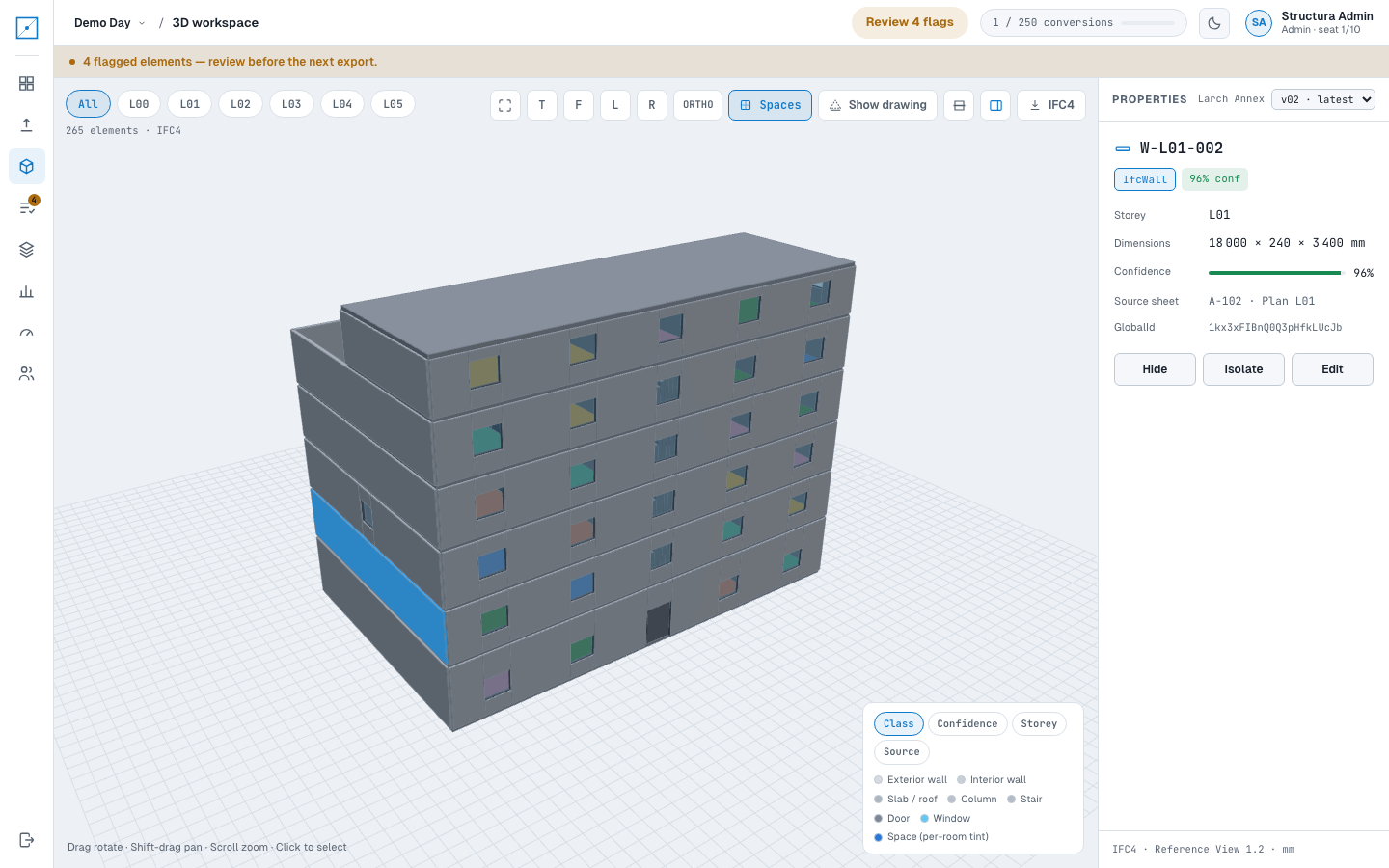
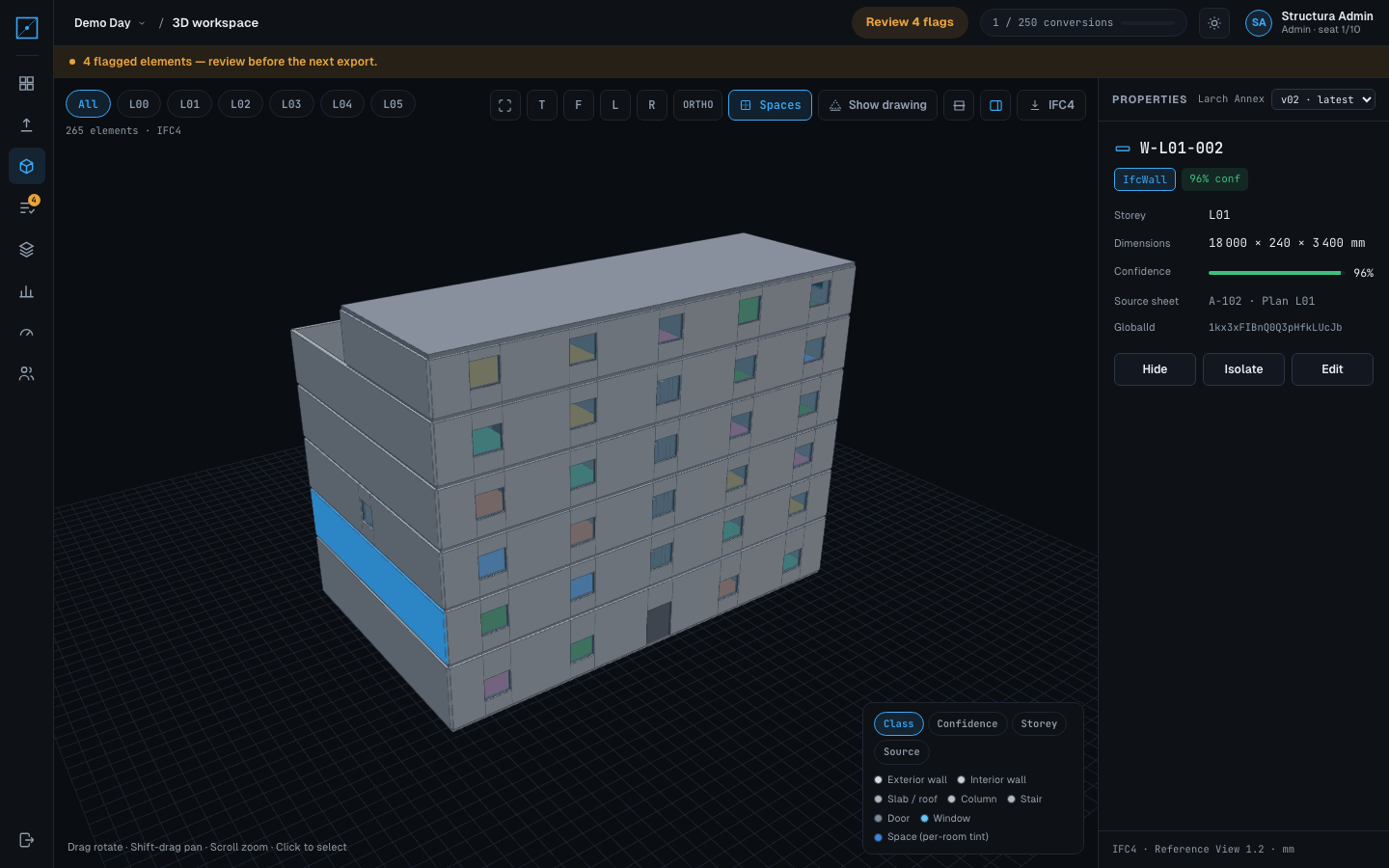
The Structura 3D workspace on the Larch Annex sample in the app's dark theme: the six-storey model in the viewport with one exterior wall highlighted, the properties panel beside it naming that element, its class, storey, dimensions in millimetres, confidence, source sheet and IFC GlobalId, and a class legend below.
Larch Annex · 3D workspace · dark theme
The same Larch Annex workspace in the app's light theme, showing the same highlighted wall and the same properties panel.
Larch Annex · 3D workspace · light theme

What the last stage leaves behind: the model open in the workspace, every element selectable, each one carrying the class, storey, dimensions, confidence, source sheet and GlobalId the file was written with.

The part everyone asks about

Tools compute. Judgment decides.

deterministic

What the tools do

Parsing, detection, storey resolution, reconstruction and IFC authoring are pure functions of their inputs: no clock, no randomness, no network. The same sheets give the same model, and the same model gives the same file — identical GUIDs included. That is what makes a re-export diffable instead of a new building.

judgment

What judgment does

Reading a titleblock to decide a sheet is the second-floor plan. Choosing between a door and a window when the block could be either. Deciding what a room is called when two labels sit inside one region. Judgment never draws geometry: it calls the same tools everyone else calls, and every default it applies is recorded.

The artifact of judgment
There is no way to inspect a decision that was never written down. So every default the pipeline applies becomes a ledger entry — what was assumed, on what basis, and what it affects — delivered as a file beside the model, not buried in a log.
Larch Annex · assumptions.json

The assumptions ledger

Distinct assumptions recorded for the Larch Annex sample, most-applied first
Assumed Basis Affects Scope Entries
Door head height 2100 mm assumed PRD §8 default door opening height
element
D-L00-002
53
Floor slab outline inferred from the exterior wall envelope docs/DXF_CONVENTIONS.md — no per-storey slab is dimensioned floor slab extent
storey
6
Space clear height taken as the storey height (3400 mm), floor to underside of the slab above docs/MODEL_SCHEMA.md — storey height_mm is the clear height space height and volume
storey
4
No room label inside this region; name and number left unset docs/SPACE_PIPELINE.md §3 label rule space name and number
element
SP-L02-009
2
Region closed across 1 gap(s) of up to 180 mm in the wall graph docs/SPACE_PIPELINE.md §1 leaky-region rule space boundary, area and confidence
element
SP-L04-004
2
Sill 1000 mm and height 1500 mm assumed — no elevation covers the north facade uniform sill/head note on A-201 · Elev South, A-202 · Elev East window vertical placement
element
WN-L00-007
2
Roof slab inferred on the top storey from the same envelope docs/MODEL_SCHEMA.md — roof slab sits on the top storey roof slab extent and level
storey
1
Sill 1000 mm and height 1500 mm assumed — no elevation covers the west facade uniform sill/head note on A-201 · Elev South, A-202 · Elev East window vertical placement
element
WN-L02-006
1

Real rows from the sample package: 8 of the 12 distinct assumptions in this model, which together account for 75 ledger entries — one per element, storey or building the assumption was applied to. An element-scoped entry names the element it was applied to; the table shows the first id of each group, so a reviewer can jump straight to it.

Download the ledger with the sample package →

Nothing is accepted on the pipeline's word

The review loop

Every detection carries a confidence score out of 100. Anything the pipeline scored below 70 is flagged and queued for review before the model is signed off — and a reviewer can switch the queue to show every detection, not only the flagged ones, when they want to audit the confident majority too.

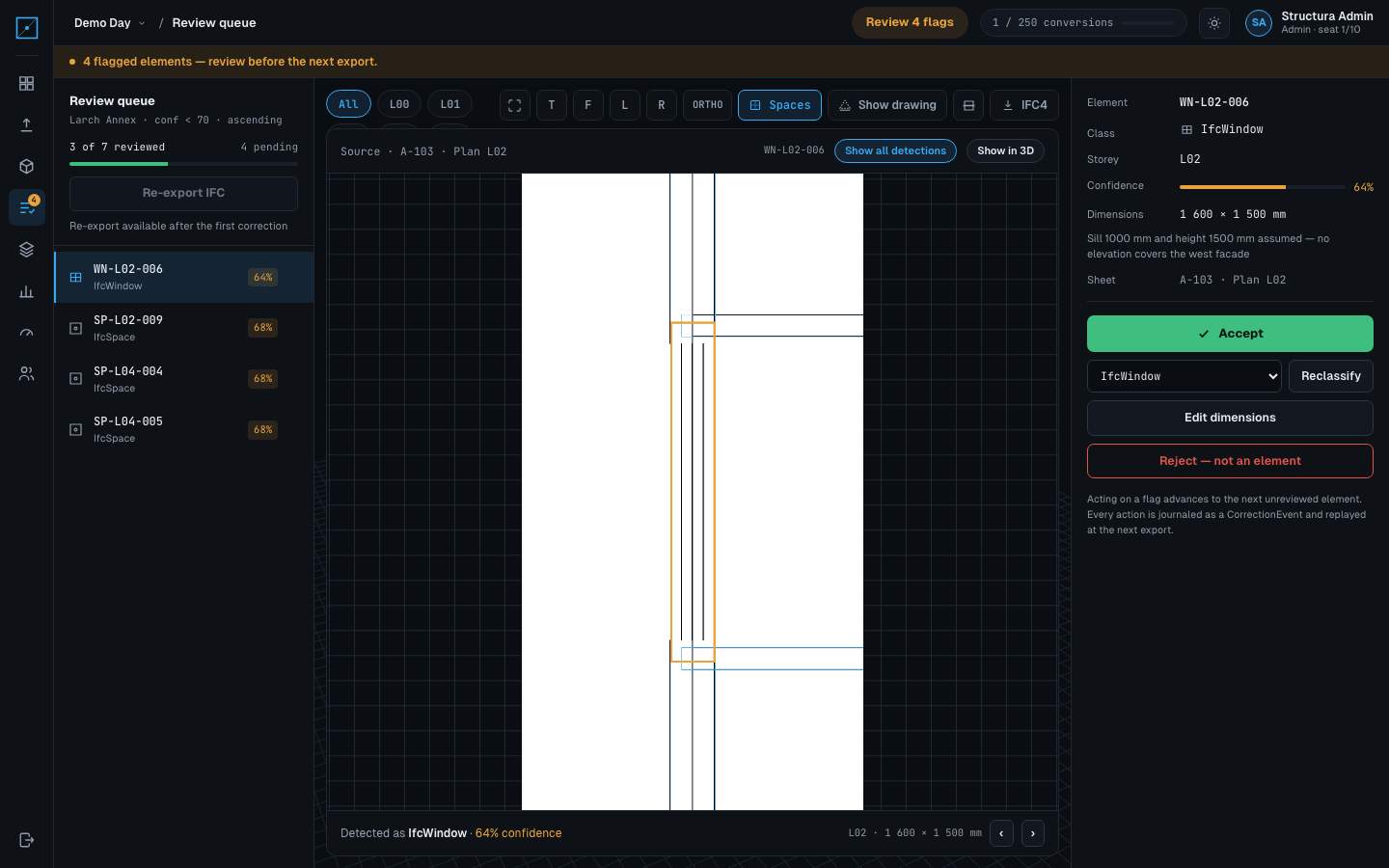
Each queue item is shown beside an evidence tile: a crop of the drawing the element was detected in, with the element outlined on it. You are comparing the model to the drawing, not to a description of the drawing.

Reviews do not edit the exported file in place. They accumulate as corrections and are applied by a re-export, which produces a new immutable version.

Five verbs
  • Accept

    The detection is right. The element keeps its class and dimensions, and the flag is cleared with your name against it.

  • Reclassify

    Right object, wrong class — a window read as a door. Pick the correct class and the model is rebuilt with it.

  • Edit dimensions

    Right class, wrong numbers. Type the dimension the drawing actually shows; the geometry and the schedule follow.

  • Reject

    Not a real element. It leaves the model, and the rejection is recorded rather than quietly dropped.

  • Rename

    A room whose label the drawing never gave, or gave wrongly. Naming a space does not move it, so its identity — and its GUID — is unchanged.

The Structura review queue on the Larch Annex sample in the app's dark theme: the flagged elements listed on the left with their classes and confidence, the evidence tile in the middle showing the crop of the plan sheet with the flagged window outlined in amber and the other detections in the same crop outlined in blue, and the accept, reclassify, edit-dimensions and reject actions on the right.
Larch Annex · review queue, all detections · dark theme
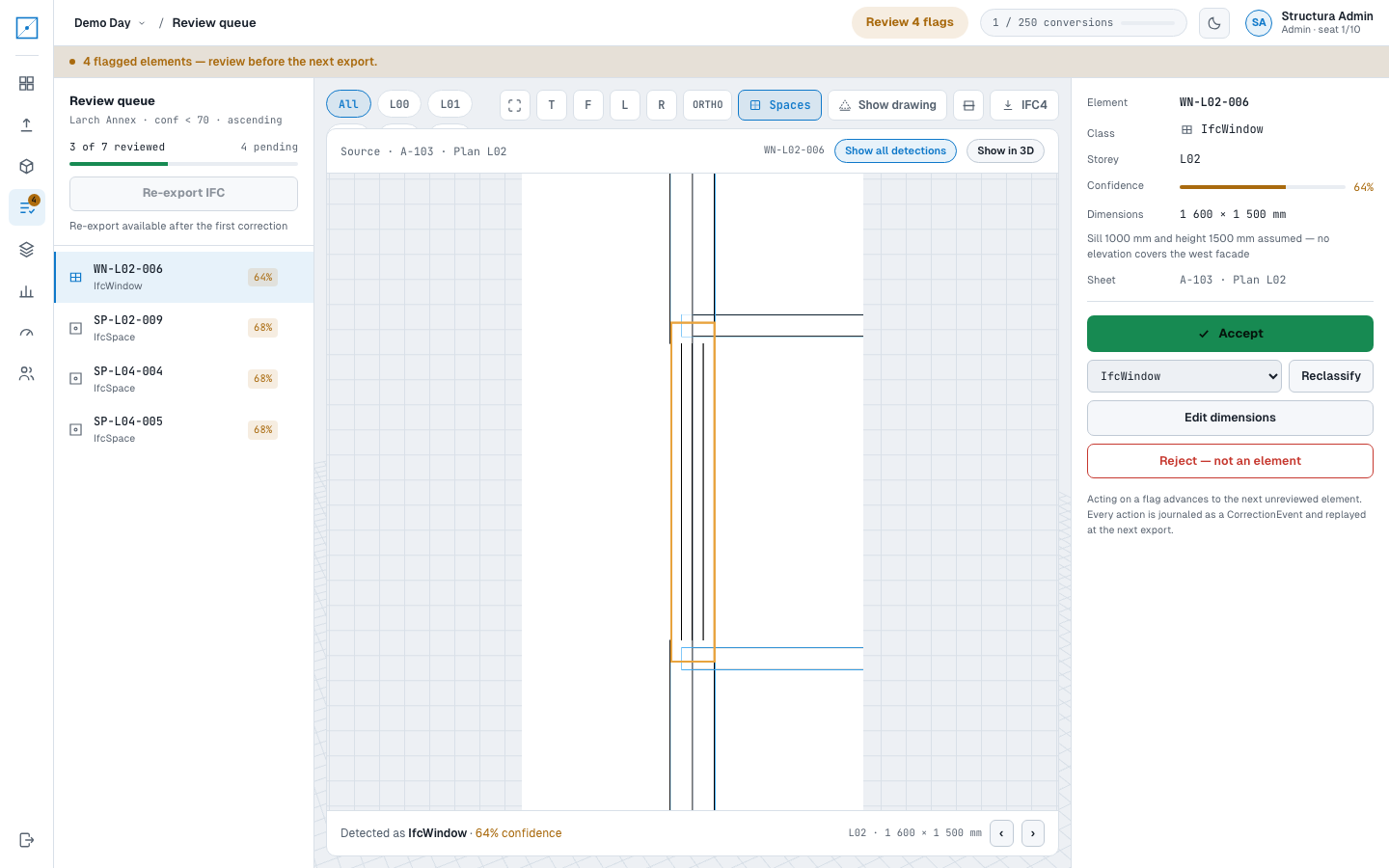
The same Larch Annex review queue and evidence tile in the app’s light theme, with all detections shown rather than the flagged element alone.
Larch Annex · review queue, all detections · light theme

The crop above is the real tile the app serves for a flagged window on a plan sheet of the sample, with all-detections switched on: the flagged element is outlined in amber and everything else the pipeline found in the same crop is outlined in blue. That is the whole argument for the queue — the drawing is on screen next to the claim.

After the review

Versions, sharing, exports

immutable

Versions

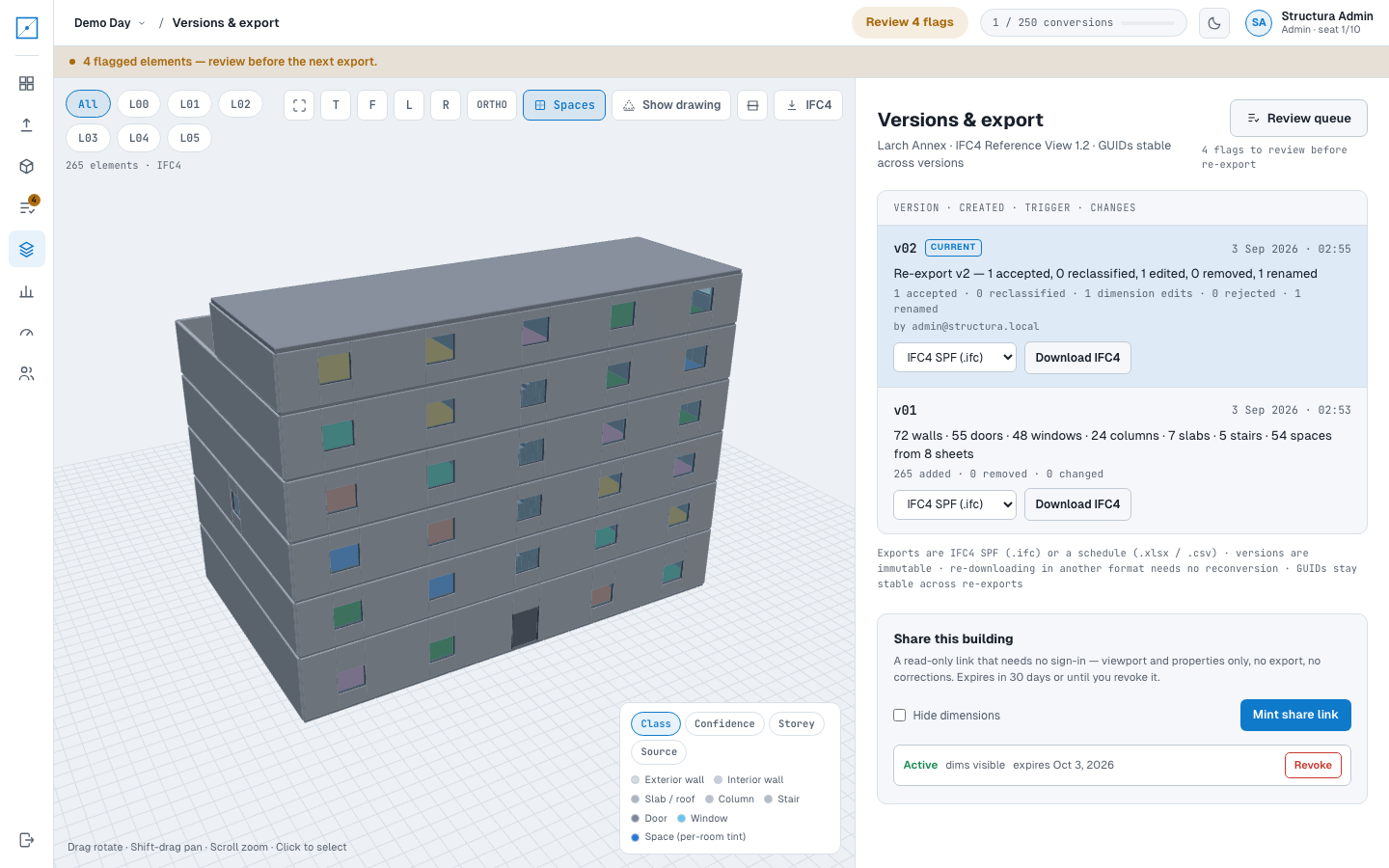
Each re-export is a new version that never overwrites the last one. Its label is the diff itself — how many detections were accepted, reclassified, dimension-edited, rejected and renamed — with the reviewer's account against it. Older versions stay downloadable, so a model issued last month can still be produced.

read-only

Share links

A version can be published as a read-only link: the recipient opens the model in a browser with no account and no sign-in, sees the elements and their dimensions, and can change nothing. It is how you send a model to someone who will never install a BIM viewer.

exports

What comes out

The IFC file itself, an element schedule as a spreadsheet and as CSV, and the assumptions ledger as JSON. The same four artifacts make up the sample package on the deliverable page, regenerated from the fixture drawings rather than hand-made.

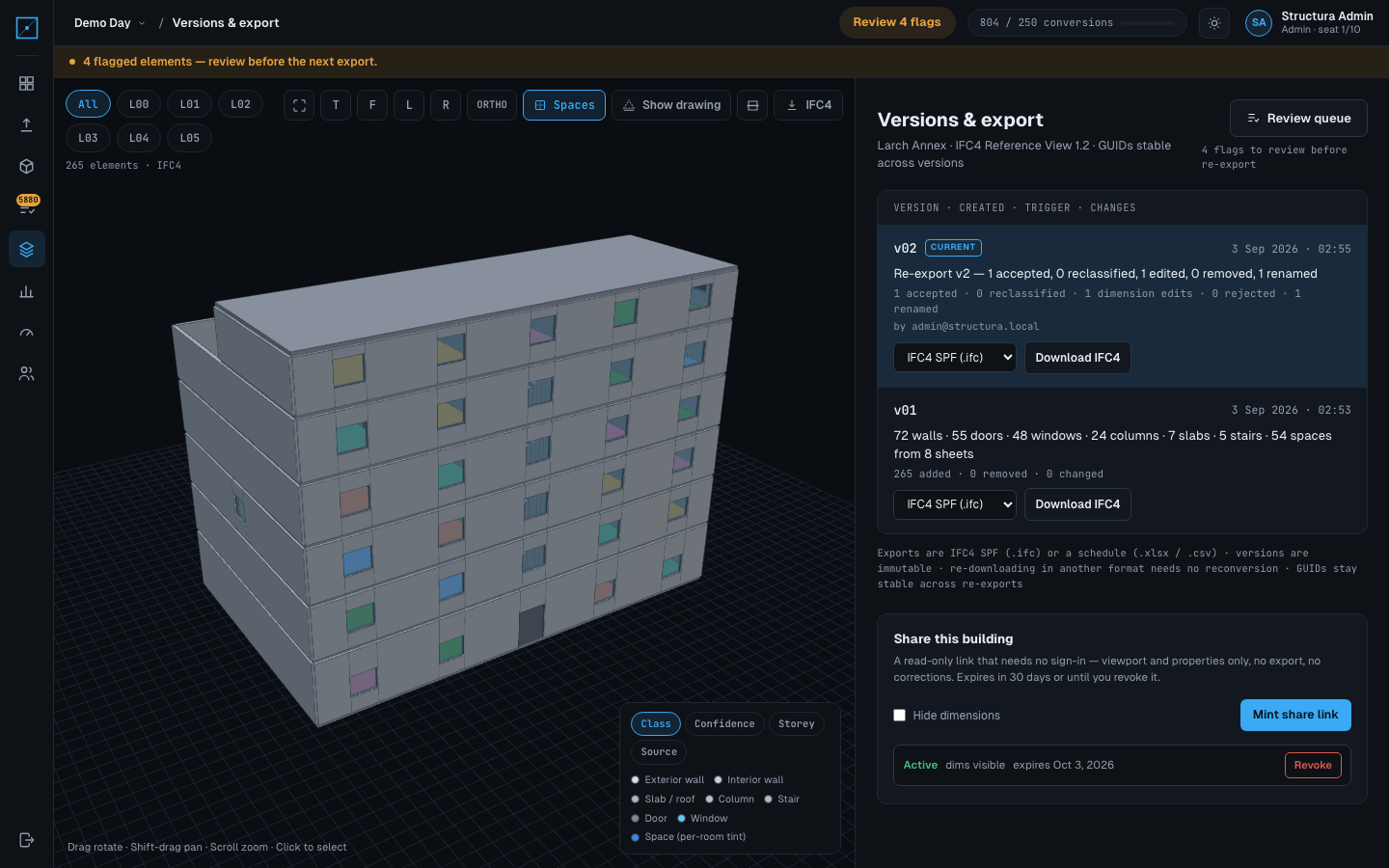
The Structura versions screen for the Larch Annex sample in the app's dark theme: two immutable versions, each labelled with what changed and who exported it, each with an export-format select and a download button, and the share panel below listing one active read-only link with its expiry.
Larch Annex · versions, export format, share link · dark theme
The same Larch Annex versions list, export-format selects and share panel in the app’s light theme.
Larch Annex · versions, export format, share link · light theme

One screen, three of the claims on this page at once: the version rows and what each re-export changed, the format select that re-downloads the same immutable version as the file or as a schedule without reconverting anything, and the share panel with a live read-only link and the date it expires.

What is actually in the IFC →

Run it on your sheets

The honest way to find out whether this survives your drawings is to convert a set of them. Send us the sheet list and we will run the pipeline with you, then hand back the file, the schedule and the ledger of everything it had to assume.